Steps
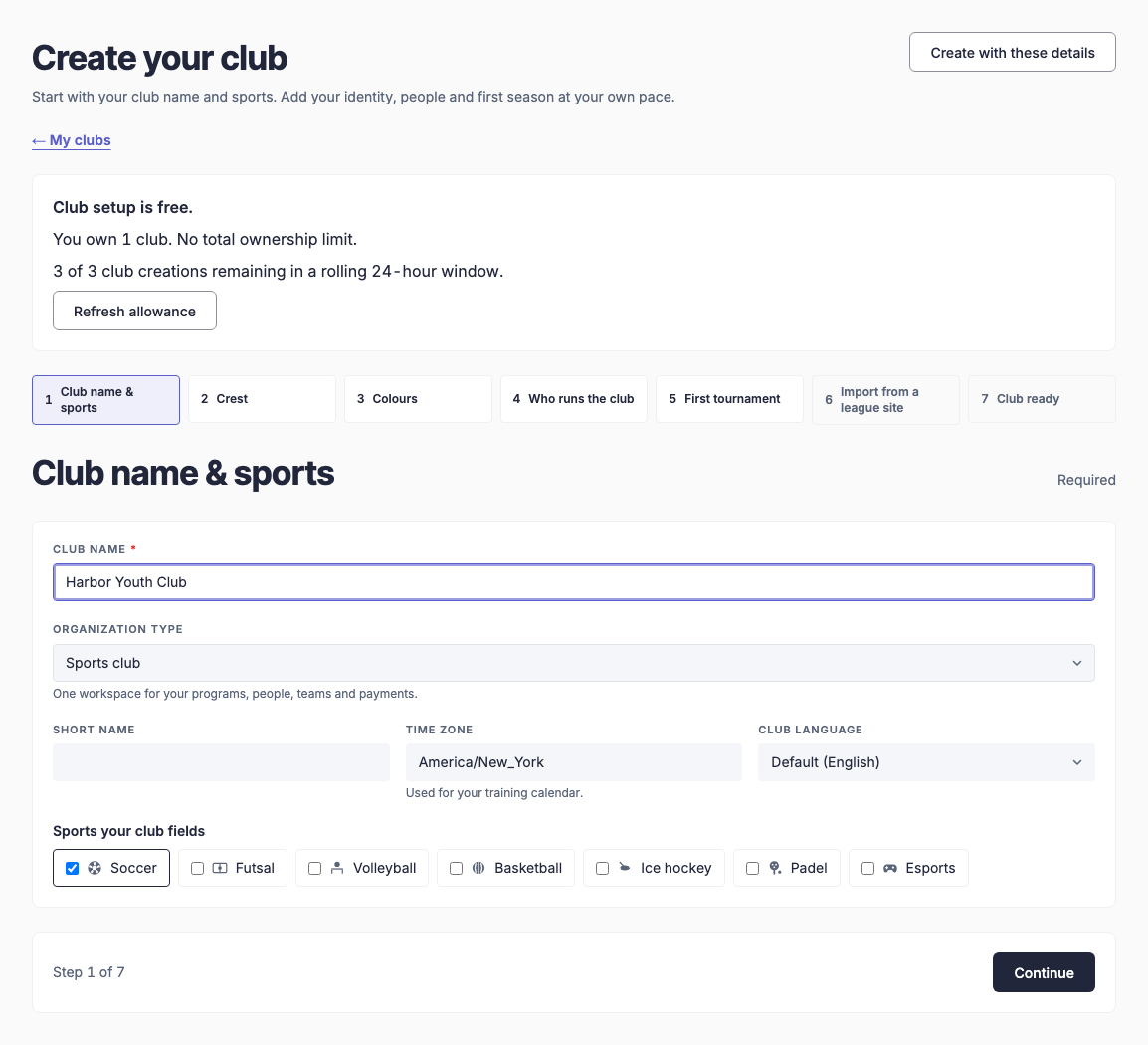
- Sign in to the organizer console and open My clubs. Choose the option to create a club, or use Create your club below. Check the creation allowance shown on the page.
- In Club name & sports, enter the club name and optional short name. Select the organization type and sports you actually run. Check Time zone and Club language; the time zone affects your training calendar.
- Choose Continue to work through Crest, Colours and Who runs the club. Staff invitations are optional. Check each person's role before inviting them.
- In First tournament, decide whether to create a first tournament. Continue to create the club, or use Create with these details when you only need the details already entered.
- Read the confirmation and any separate crest or invitation messages. An optional step can fail even when the club was created. If creation is unconfirmed, check My clubs before trying again.
- Open Club Office for the new club. Add players, organize teams and set up your first training or registration program. Keep the club's join code for invitations; do not publish it as if it were an app-store download link.
- On iPad
- Open the console in your iPad browser. Landscape gives the setup steps and forms more room.
Club setup starts in the console. The shared Club app then opens the clubs your signed-in account belongs to. Only owners and authorized staff see management controls.
More Club app guides
How do I sign in to my club's app?
Install your club's app and sign in with the same account on every device.How do I join my club with a code or invite link?
Open the invite link, or type the join code your club gave you.How do I see the schedule and answer Going or Can't go?
Answer from the Home tab, and change your answer while answers are open.How do I use club chat and turn on notifications?
Message your club, your teams or one person, and get alerts for new messages.Coaches: how do I create and edit a training?
Create one-off or weekly trainings, and choose who is invited and how they answer.Coaches: how do I set the lineup and record who played?
Pick the squad on the pitch, notify players, then confirm who played after the game.How do I enter a game result and goal scorers?
After kick-off, enter the score and add goals and cards.Where do I see my stats, appearances and the club's top scorers?
Team tables and leaderboards on the Stats tab, and your own record on your player page.How do I switch between light, dark and my club's look?
Choose how the app looks on your own phone, whatever your club's default.Club admins: how do I set our crest, colours and links?
Brand the app with your crest and colours, and check the result in a live preview before saving.How do I register for a season, pay dues or get tickets?
Register in the app and pay securely in your browser.Club admins: how do I manage members, teams and staff?
Club Office in Profile holds players, teams, staff, codes and payments.How do I prepare a club crest and add it to EasyChamp?
Upload your own image, preview it at small size and carry your club identity into the app.How do I add club players and organize them into teams?
Start with player records, assign teams, then invite people who need app access.How does my club in the console connect to the mobile app?
Use the same club and account, then check membership, roles and the selected team.How do club teams, imported results and match details stay connected?
Check the linked competition and player identities before editing or importing data.How do I connect my club's payments and bank payouts?
Confirm the club owner and receiving business, complete Stripe setup and check both payment and payout readiness.How do coaches see who is going, unavailable or still unanswered?
Read the event's responses before selecting your squad or planning training.How do I prepare my team with a lineup and tactical board?
Check availability, choose the match squad and share a clear plan with players.How do I plan training around the players and time available?
Start from a calendar session, review attendance and build a practical training plan.Can I connect a GPS tracker or watch and see distance covered?
Understand which stats come from match records and what to check before relying on wearable data.