Facilities · $29/month · 7-day free trial

Sports facility management software and pitch booking system

Your own booking page for courts by the hour, open play and memberships

Set up your courts and prices once. Players pick a free time and pay online, join open play by the spot, or sign up for a membership, all on your own page. Payments go straight to your Stripe account, and EasyChamp takes no booking fees.

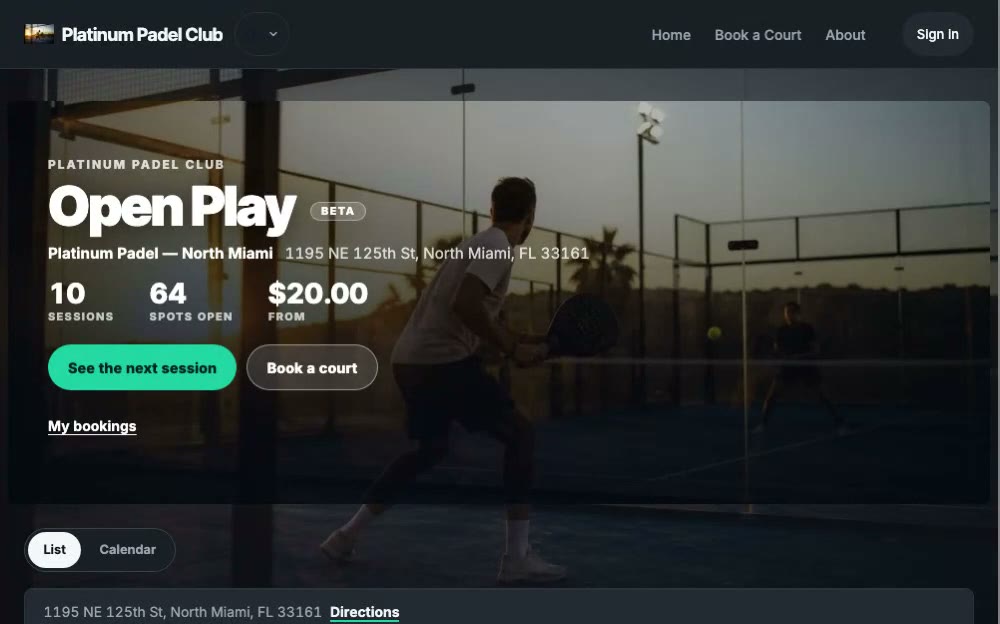
Recorded on the live Platinum Padel Club booking page.

What you can sell

Four ways a venue earns, on one page

Courts by the hour

Players pick a day, how long they want to play and a free time. The whole court is theirs, paid at booking, and the time shows as taken at once, so it is never sold twice.

Open play and clinics

Sell a session by the spot with a capacity. A weekly template fills the next two weeks by itself, a full session offers a waitlist, and a game that misses its minimum refunds everyone.

Memberships

Monthly or annual tiers with member court prices, a longer booking window and more bookings at once. Members pay by card on a subscription that renews into your Stripe account.

Lessons with your coaches

Private and weekly lessons, online or in person, each coach with a public page and their own income report.

How lessons work

Soccer, futsal, padel, tennis, pickleball, basketball and volleyball: each court carries its own sport, format and session length, so one venue can run them all.

Watch how it works

Set up your venue in five short videos

Each one is a real walkthrough of the console, narrated and captioned, from creating the facility to publishing the booking page.

Create your facility1:09
Add courts and rent them by the hour1:07
Weekly open play and one-off sessions1:26
Sell memberships1:01
Your overview and publishing1:14

Live right now

A real booking page, taking real signups

The live Platinum Padel Club open-play booking page: session list with per-player prices, capacity counters and Join buttons

Platinum Padel Club: North Miami, FL

Four panoramic glass padel courts in North Miami, taking open-play signups and whole-court bookings right now.

Per-player prices, live capacity counters, Americano nights, whole-court rentals and an automatic refund when a game does not fill. Everything on that page is the shipped product, on a real tenant, today.

Open the live page

What it does

Open play, run once and then left alone

Courts and fields, not rooms

A facility holds its courts, fields and partitioned spaces. Each one carries its own sport, so a soccer pitch and a padel court can sit in the same venue with different formats and different session lengths.

One weekly template per court

Define Tuesday 19:00, 14 spots, once. Sessions for the next two weeks appear on your public page by themselves, and they hold their wall-clock time across a daylight-saving change because the template is anchored to the facility's own timezone, not to UTC.

A signup that cannot oversell

For a free session, players give a name and an email, no account. For a paid one they sign in once, so the payment and any refund are tied to them. The last spot is never sold twice, even when two people tap at the same moment, and a player who cancels frees their spot immediately.

A public page on your league site

The booking page is served from your own league host alongside your fixtures and tables, so players who already follow the league find open play in the same place.

One roster for the whole week

Every signup lands in your console as a name and an email: one chronological list across the next two weeks, searchable by player, day or court, with a copy-all-addresses button and a CSV you can open at the gate. Removing someone frees their spot immediately.

Paid at booking, refunded by your rules

Players pay by card when they book, into your own Stripe account. Your cancellation window decides the refund, a game that does not reach its minimum refunds everyone automatically, and cash or Zelle bookings can be marked as paid in the console.

White label

Your brand, your page, your domain

Every facility on EasyChamp runs on the same tenant machinery our league sites use: the booking page is your site, not a listing inside ours.

Your own address

Your booking page lives at your own address (yourclub.at.easychamp.com) next to your fixtures, tables and news, free and live the minute you publish. Serving that same site from a domain you own is a setup we do with you on a paid plan, quoted per facility.

Your colors, your badge

The whole site takes your brand: primary and secondary colors, your crest, your typography accent. Players see your club, not ours. EasyChamp signs the footer and stays out of the way.

Your prices on every session

Sessions show your per-player price, and players pay online when they book. Payments settle to your connected Stripe account. EasyChamp charges no transaction fees. A subscription publishes the booking page; payment processor fees apply separately.

What it costs

Free to build, $29 a month to publish

Building your venue is free and always will be: add courts, set weekly slots, and look at the booking page yourself as often as you like. Publishing is the paid step. It is what opens the page to everyone with the link instead of only to you.

The founding rate is $29 a month against a standard $49, and the first 7 days are free. Nothing is deleted if you stop: your courts, weekly slots, sessions and bookings stay exactly as you left them and the page comes back when the plan does. Every rate is on the pricing page including the annual and multi-venue options.

No EasyChamp booking transaction fees. Payment processor fees apply separately.

Questions

Facility booking on EasyChamp: asked and answered

Can the booking page run on my own domain?
Yes, as a white-label site. Every facility gets a branded page at its own EasyChamp address (yourclub.at.easychamp.com), free, styled with your colors and crest. Serving that same site from a domain you own is a concierge setup: on a paid plan we do the DNS, the certificate and the routing with you and quote it per facility, because there is no self-serve toggle for it.
What does facility booking cost on EasyChamp?
$29/month at the founding rate against a standard $49/month, with the first 7 days free. Building the venue is free. The subscription publishes the booking page. No EasyChamp transaction fees. A subscription unlocks organizer features. Payment processor fees apply separately.
Can players rent a court by the hour?
Yes. Turn on court rental and set the price, the lengths you allow and your opening hours. Players pick a day, a length and a free start time on your booking page and pay by card. The time shows as taken the moment it is booked, and your cancellation window decides the refund if they cancel.
Can I sell memberships?
Yes. Create monthly or annual tiers with an optional joining fee and minimum commitment, and give members a lower court price, a longer booking window or more bookings at once. Members subscribe by card on your booking page, the subscription renews into your own Stripe account, and you can also grant a membership by hand.
Do players need an EasyChamp account to book a session?
Not for a free session. A player gives a name and an email on the public page and the spot is theirs. A paid session asks the player to sign in, because the account holds the payment, the booking and any refund. A player who is signed in books in one tap. Their name and email come from their account and the email cannot be mistyped, which matters because cancelling a spot needs that exact address.
Does EasyChamp email my players when they book?
Yes. Every booking sends the player a confirmation email with the time, the court, what they paid and how to cancel, and a reminder goes out the day before. Cancellations, refunds and a game cancelled for too few players are emailed too. Players pay online when they book, into your own Stripe account, a full session offers a waitlist that hands the next spot on automatically, and the booking also comes with a calendar file.
Can two people take the last spot at the same time?
No. The signup is written first and counted second, and rolls back if it would exceed the capacity, with a database-level uniqueness rule on the session and the email. A full session answers that it is full rather than quietly overbooking, and the same email cannot take two spots in one session.
What happens to a session when the clocks change?
It stays at the same wall-clock time. A weekly template is anchored to the facility's own IANA timezone and stores the local start as the truth, so a 19:00 session is at 19:00 the week after the change as well.
Can a full session become a tournament?
Not yet. A session can be marked as a tournament kind and shows a badge for it, but nothing turns a signup list into a bracket automatically. Deliberately, because a bracket built from a list that has not been filtered for no-shows is a wrong bracket. Converting a session into a real competition is an owner-triggered action still being built.
Does editing a template change sessions that already exist?
No. A session copies its settings when it materializes, so changing the template moves future sessions only. Deactivating a template stops future ones and leaves everything already published, and its signups, untouched.
Is this the same account as my league?
Yes. A facility lives inside your organizer account, so the same login runs your competitions and your open play, and the booking page sits on the league site you already publish.

The rest of the platform

The same account runs the season

Sports facility management software | EasyChamp